Managing your organization
An organization is your top-level workspace in Anvil, and it's the scope everything else sits inside. It owns your projects, members, devices, and billing. You can belong to more than one organization (a personal one and a company one, for example) and switch between them at any time. Nothing is shared between organizations: each has its own projects, members, devices, and subscription.
The dashboard, events, logs, and errors views all cover the organization you're currently in, filtered to whichever projects you've selected.
You get your first organization when you create your Anvil account.
Switching organizations
The organization you're in is shown at the top of the sidebar. Click it to open the switcher and pick another one. The whole app (dashboard, data views, settings) switches to that organization.
Creating another organization
- Click the organization at the top of the sidebar and choose Add organization.
- Enter a name for the organization.
- If you're prompted, choose a plan. Your first organization can run on the free Hobby plan; creating additional organizations may require a paid plan, in which case you'll set up payment before the organization is created.
- Optionally create your first project to finish setting up.
Editing organization settings
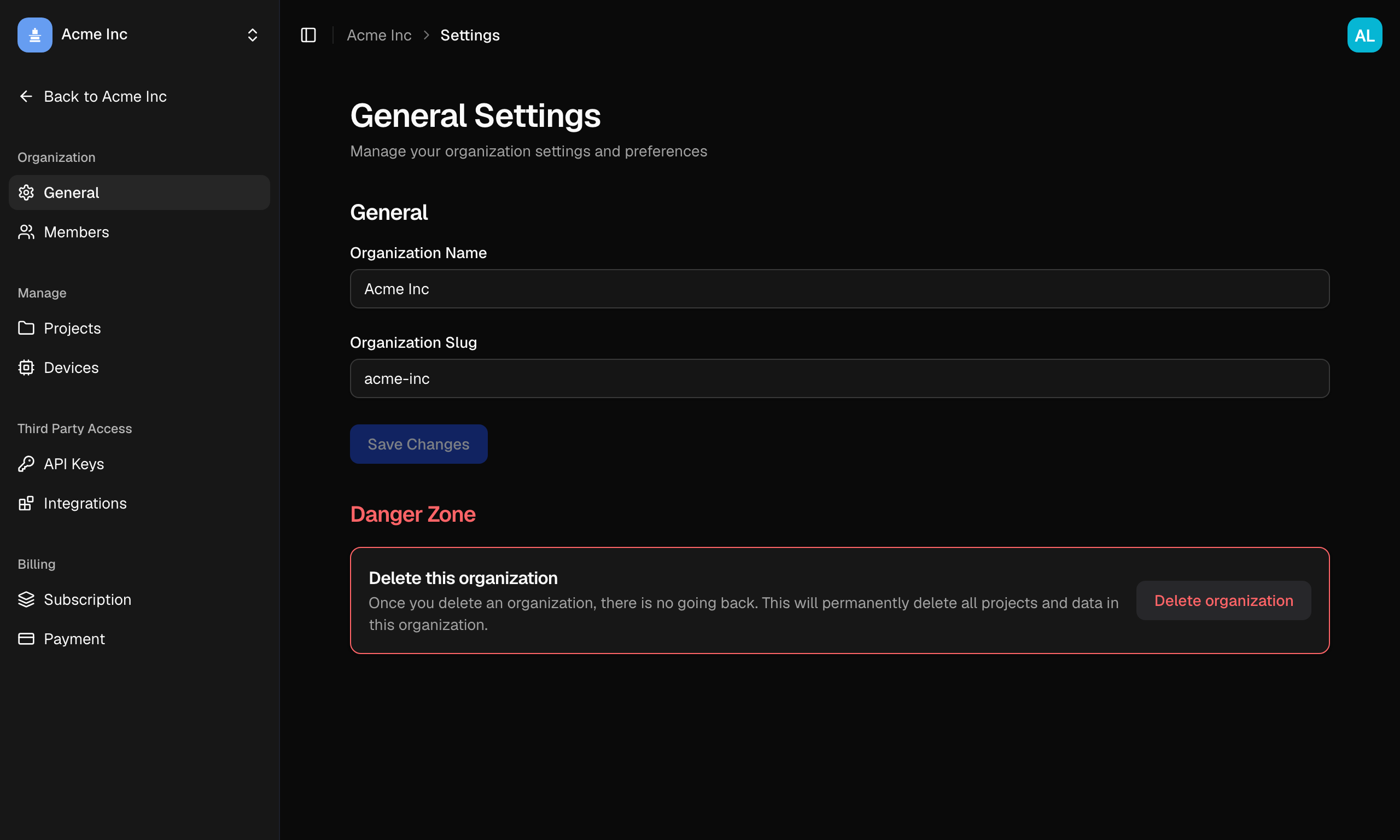
Go to Settings → General (owners and admins only):
- Organization Name: how the organization appears throughout Anvil.
- Organization Slug: the short identifier used in your Anvil URLs (lowercase letters, numbers, and hyphens).
Click Save Changes to apply.
Deleting an organization
- Go to Settings → General.
- Scroll to the Danger Zone and click Delete this organization (owners only).
- In the confirmation dialog, type the organization's name exactly, then confirm.
Deleting an organization is permanent. It removes the organization and all of its projects, along with their telemetry and API keys. This can't be undone.
Other organization settings
The settings sidebar also holds:
- Members, covered in Members & roles.
- Projects and Devices, the same pages the main sidebar links to.
- API Keys, for organization-level secret keys that grant API access. These are still in development; the per-project driver tokens your drivers use live in each project's settings.
- Integrations, for connecting Anvil to issue trackers, chat, and alerting tools. Also still in development, with a link to vote on what you'd like to see first.
- Subscription and Payment, covered in Subscription and Billing.
Which of these you see depends on your role.
Further reading
- Members & roles, invite people and control what they can do
- Projects, create and manage the projects in your organization
- Subscription and Billing, your plan, usage, and payment